 Social media can help churches communicate, invite and build community. A small, consistent and well-managed presence is usually more effective than trying to be everywhere.
Expectations of behaviour
Church social media is part of Christian witness. Communicate in ways that are gracious, truthful and generous. Avoid arguments or responding in anger, and be especially midful with humour, tone and responding to criticism.
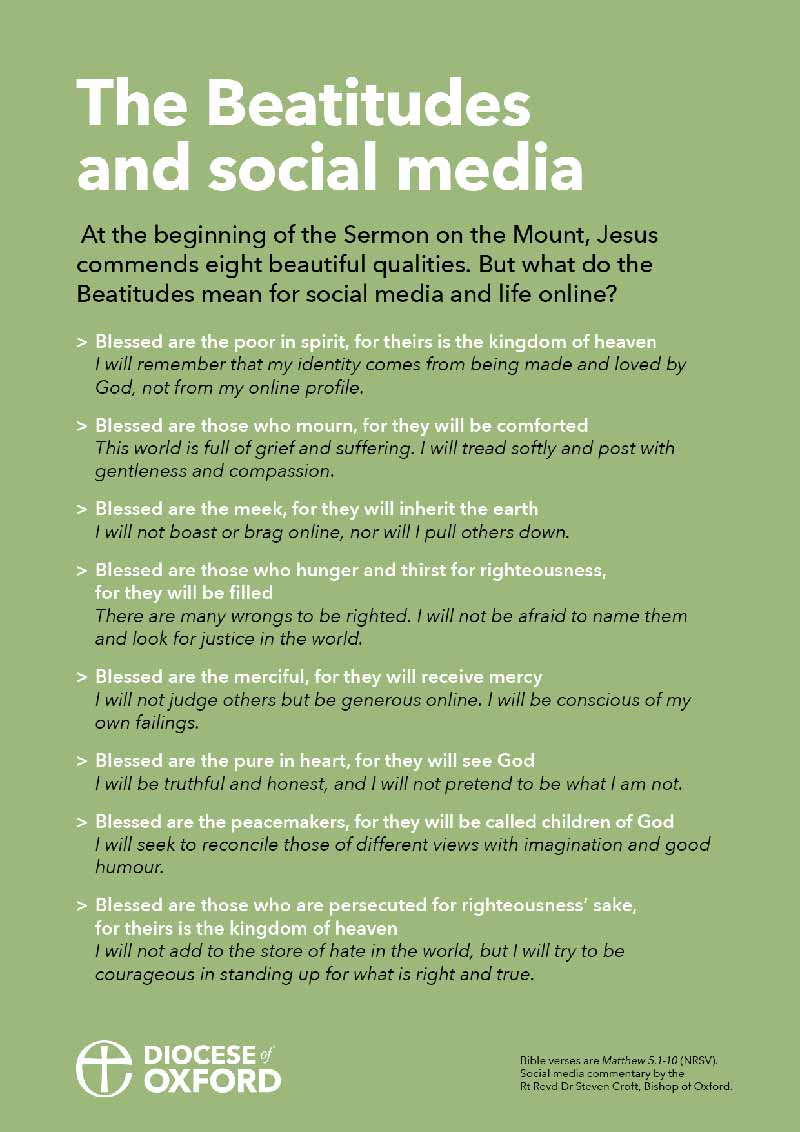
We believe the Beatitudes have ancient wisdom which holds true for us today online. It can be helpful to share these in a pinned post, to help set expectations of all who interact with your page.
Key platforms (at a glance)
You do not need to use all of these! Choose the platforms that best fit your people and capacity.
Formats: text, images, events, links, short- and long-form video, livestreams, stories (posts that expire after 24 hours)
Who and how: Broad age range; often used for local community information, events, and longer updates. Still the most effective platform for reaching local residents and churchgoers. Community groups are a particularly good place to see what's going on in your neighbourhood and how you might respond to that.
Formats: square or vertical images, short-form video (Reels), stories (posts that expire after 24 hours)
Who and how: Primarily under-50s; visual storytelling, behind-the-scenes moments, short reflections, invitations.
Formats: short vertical video
Who and how: Teenagers and young adults; informal, authentic, people-focused content works best. Useful for testimony, invitations, and simple storytelling.
Formats: longer video, recorded services, playlists, livestreams
Who and how: Wide age range - essentially a search engine for video content. Great for regular livestreaming, posting short clips of prayers or sermons.
Formats: text, images, short video, links
Who and how: Existing communities; best for internal communication, prayer chains, or small groups rather than public outreach. Utilise the community and groups functionalities.
Sustainability
A sustainable approach is more important than a wide presence - it is better to use one or two platforms well than several inconsistently. Consistency is rewarded by most platforms: posting regularly, even once a week, is more effective than bursts of activity followed by silence.
Ensure at least two people have access to accounts and understand how they work. This helps plan for holidays, illness, and changes in leadership, as well as helping ensure good safeguarding practice.
Safeguarding
All normal safeguarding policies and practices apply online; follow your parish and diocesan safeguarding guidance when posting images, video or names, and crucially when replying to messages and comments. Avoid sensitive one on one conversations online - you can always ask to continue dialogue face to face in a safer setting.
Take particular care when children or vulnerable adults appear in content.
If at any point you believe there is a safeguarding concern, follow your usual safeguarding procedures and escalation routes immediately. Do not attempt to manage concerns solely through social media messaging.
Consent and permissions
Before posting images, video or audio, ensure that you have the appropriate consent and permissions. Obtain permission before posting identifiable images of individuals, and take particular care where children or vulnerable adults are involved, following your parish safeguarding guidance.
Be aware that safeguarding consent and copyright permission are different things. For example, you may need permission from a photographer, musician or speaker before sharing their work online. Do not repost images, music or video found online unless you are confident you have the right to use them.
When livestreaming or recording services, make it clear to those attending that recording is taking place.
When in doubt, it is better to ask permission in advance than to remove content later.
Accessibility
Making your content accessible helps more people engage with what you share.
- Use clear, simple language and avoid unexplained abbreviations where possible.
- Add captions to videos where you can. Many people watch without sound, and captions also support those who are deaf or hard of hearing.
- Where platforms allow, add alt text to images so screen readers can describe them.
- When creating graphics, ensure text is large enough to read on a phone and that there is good contrast between text and background.
Small adjustments like these can make a significant difference to how widely your content can be used and understood.
Collaborate and share
Social media works best when we support one another. Tag relevant accounts in your posts - community groups, charities, the diocese etc.
Don't feel like you need to reinvent the wheel - you can always share diocesan posts, particularly around major seasons and key church calendar dates.
Content created by a range of voices is often more engaging and representative of the life of the church. Invite contributions from across your church community:
- Youth and children’s groups
- Schools and chaplaincies
- Volunteers and ministry teams